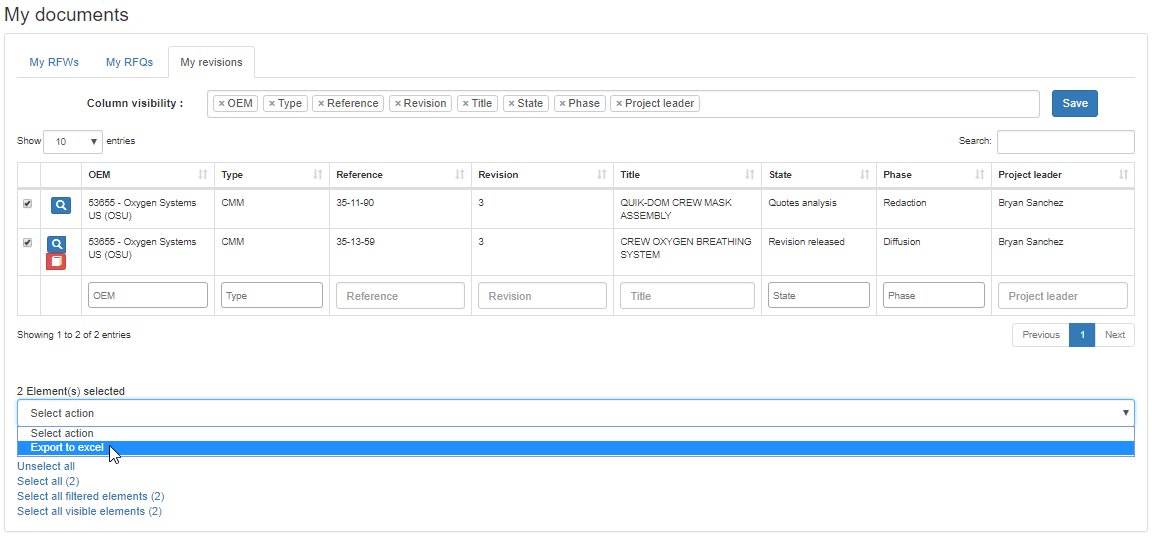
The table can be sorted by any of its column by clicking on the column header, and filtered by typing or selecting an entry for any of its column using the cell at the bottom of the column
Columns in the table can be removed or added using the column visibility field
The magnifier button () available on each row displayed in the table directly opens the corresponding item
For the rows containing revisions an additional button () allows to retrieve the PDF of the document (available only if the PDF was uploaded into TPLM)
One or more rows can be selected in the table using the selection boxes in the left column of the table and the additional selection functions at the bottom left of the table:
Unselect all
Select all
Select all filtered elements
Select all visible elements
Selected documents can then be exported to excel using the contextual drop down menu at the bottom left of the table:
 ) available on each row displayed in the table directly opens the corresponding item
 ) allows to retrieve the PDF of the document (available only if the PDF was uploaded into TPLM)