The Revision view provides the detailed data relating to all the revisions of the selected Document (CMM/SB/SIL)
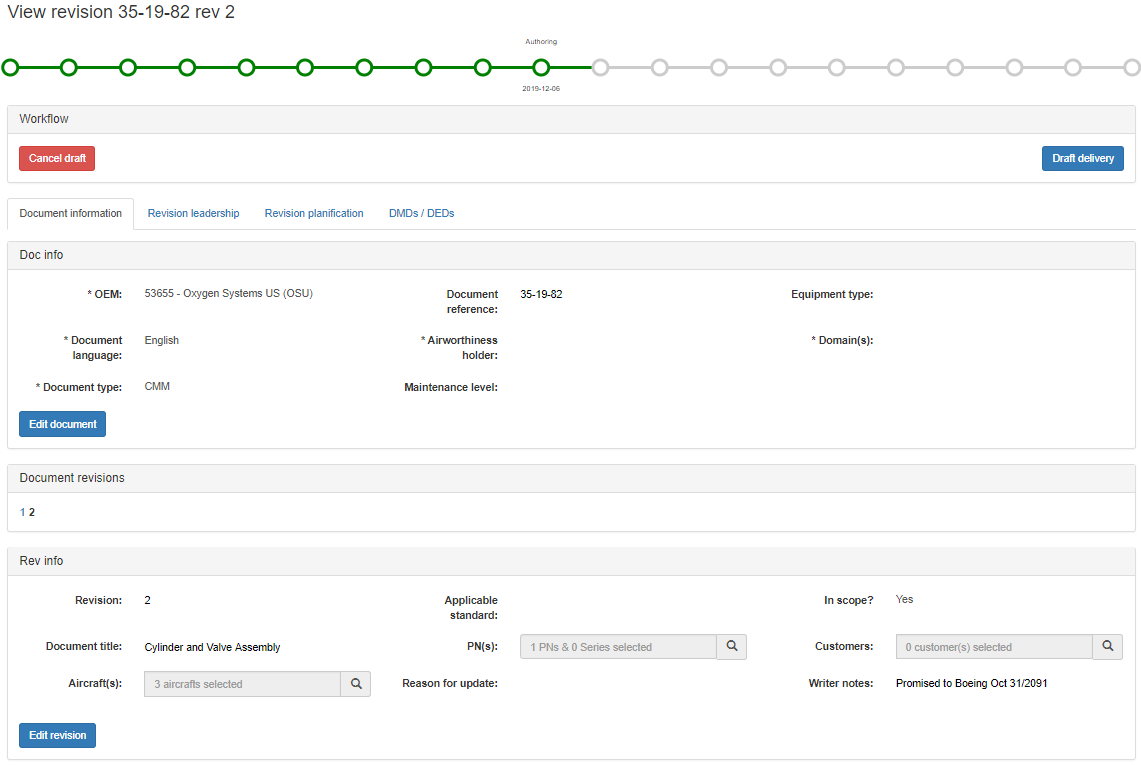
The Document reference and Document revision are shown at the top left corner of the view
A lifecycle graph reflects in green the completed steps of the Document revision project vs the complete lifecycle ; the nodes in black represent the steps which have been by-passed ; the last node in green represents the step in progress and its name & date are displayed
Different tabs contain all the information related to the selected Revision:
Document information:
The Document data is displayed and managed in the Doc info section ; these are the key parameters of the Document, which normally remain unchanged regardless of the Revision
The Revision data is displayed in the Rev info section ; these are the parameters specific to the considered Revision of the Document
Revision leadership tab:
This tab identifies the Project Leader of the Revision i.e. the focal point for any question pertaining to an ongoing Revision project, or the content of a published Revision
It is the Project Leader of the Revision who will be receiving and processing all its associated DMD or DED (see DMD, DED)
The Delegates of the Techpubs Project Leader are also listed here for reference (see Delegation)
Revision Planning tab:
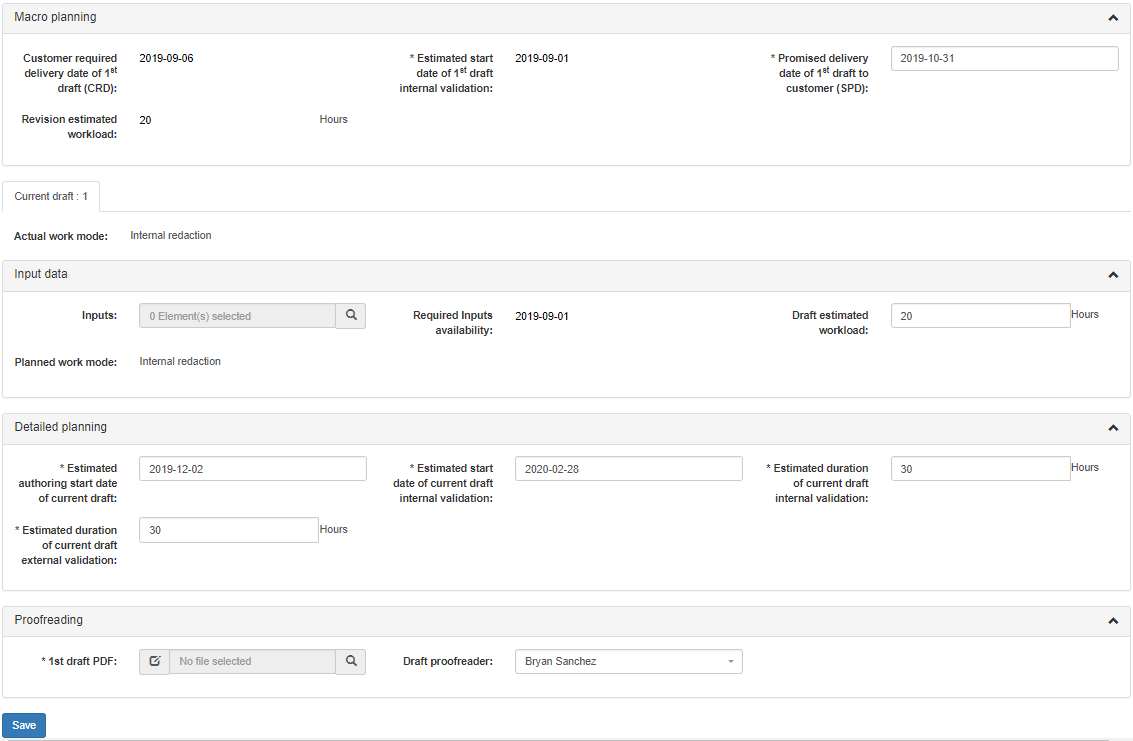
This tab is where the Revision planning is managed by the Project Techpubs Leader, first through the Macro planning section, and then through the Detailed planning section (see Planning)
The Input data section is used to track the input data identified as required at the time of macro-planning, along with their expected availability date ; it also records the estimated workload & planned work mode that have been assessed by the Techpubs Project Leader for this Revision draft (see Planning)
The internal validation & external validation reviews and the resulting comments integration steps are also tracked in this tab (see TPLM validation)
In the case of internal authoring, a Proofreading section is used to track the internal verification of the Revision
In the case of subcontracted authoring, all the associated activities – including internal verification -- are recorded in a separate dedicated RFQ tab (see RFQ)
DMDs/DEDs tab:
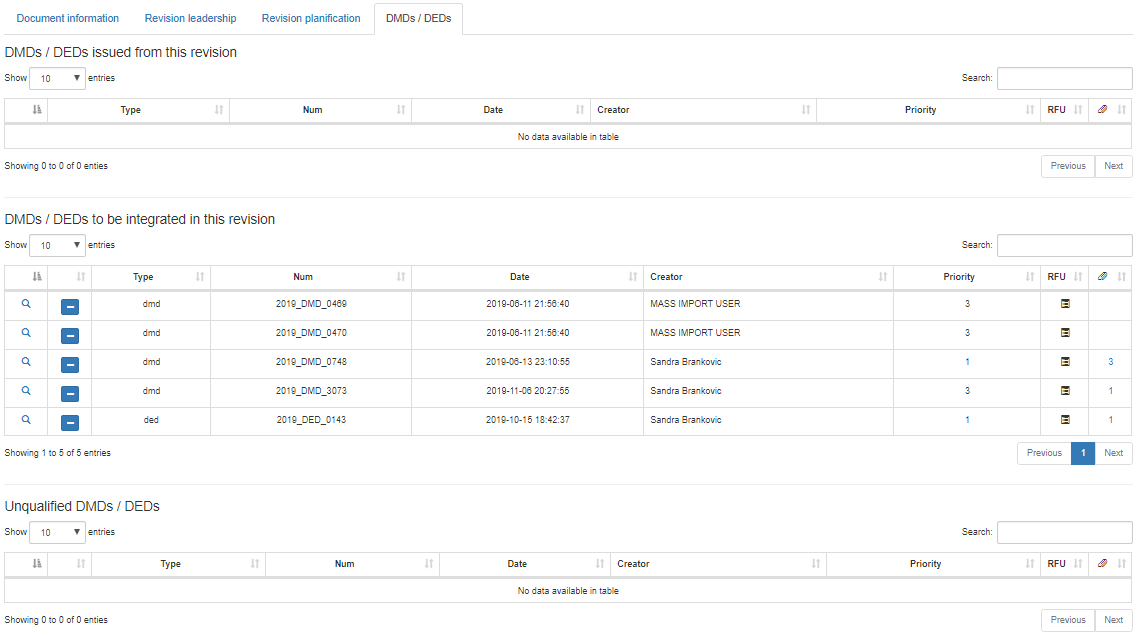
This tab identifies all the DMD and DED that relate to the Revision
The "DMDs/DEDs issued from this revision" table lists all the DMDs/DEDs that have been validated against a Revision that is in Publish state (=not an in-progress Revision) ; in effect the listed DMDs/DEDs are available driver change that can be used to launch a new Revision project
The "DMDs/DEDs to be integrated in this revision" table lists all the validated DMDs/DEDs that had been validated against previous Revision(s) of the Document and that have been selected as change driver(s) in the in-progress Revision project
The "Unqualified DMDs/DEDs" table lists all the validated DMDs/DEDs that had been validated against previous Revision(s) of the Document and that have NOT been selected as change driver(s) in this in-progress Revision project ; in the case of a Revision that is in Publish state this table displays any DMDs/DEDs not qualified in previous Revision(s)
RFQ tab or RFW tab (optional):
This tab tracks the execution phases of the authoring for the Revision project if it is subcontracted to a supplier by the Techpubs Project Leader
An activity subcontracted through a Request for Quote if tracked via a RFQ (see RFQ)
An activity subcontracted through a Request for Work if tracked via a RFW (see RFW)